Day 4 - Basic Linux Shell Scripting

Greetings! 👋 I'm Priyadarshi Ranjan, a dedicated DevOps Engineer embarking on an enriching journey. Join me as I delve into the dynamic realms of cloud computing and DevOps through insightful blogs and updates. 🛠️ My focus? Harnessing AWS services, optimizing CI/CD pipelines, and mastering infrastructure as code. Whether you're peers, interns, or curious learners, let's thrive together in the vibrant DevOps ecosystem. 🌐 Connect with me for engaging discussions, shared insights, and mutual growth opportunities. Let's embrace the learning curve and excel in the dynamic realm of AWS and DevOps technology!
Introduction
In this post, we’ll explore shell programming and its various aspects, providing a solid understanding of standard shell programs, including the Bourne Again Shell (bash). Shell scripting is integral to the Unix operating system, so a basic knowledge of Unix is beneficial. However, we’ve included some fundamental commands to get you started
What is a Shell?
A shell is a special user program that provides an interface for using operating system services. It translates human-readable commands into a format the kernel can process.
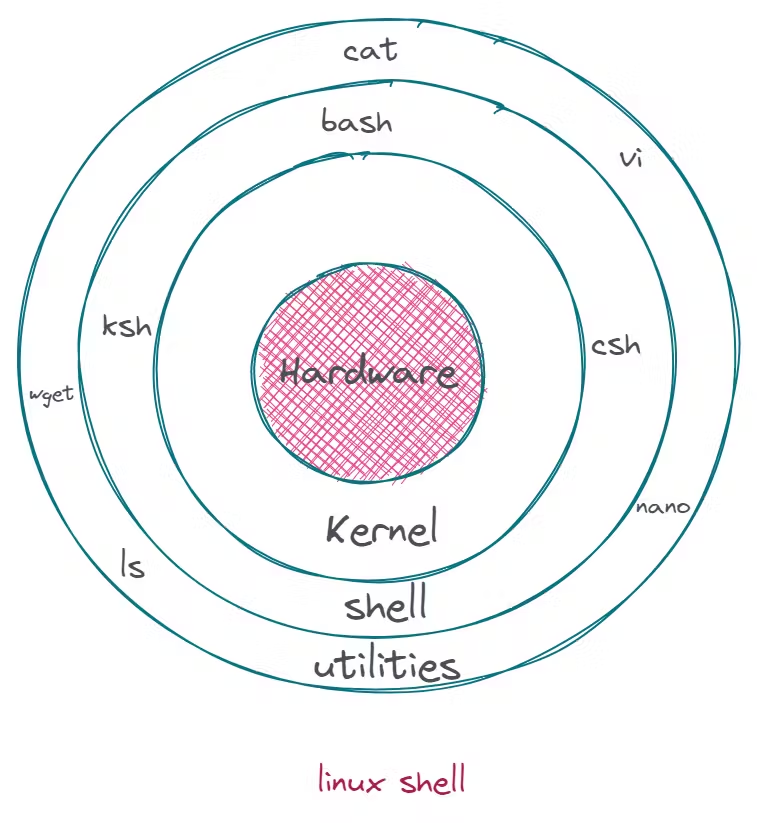
What is a Shell Script?
A shell script is a series of commands executed in sequence. Good shell scripts include comments, marked by #, explaining each step.
Example of a simple shell script:
#!/bin/sh
# First script
echo "What is your name?"
read PERSON
echo "Hello, $PERSON"
The script begins with #!/bin/sh, which specifies the path to the shell interpreter.
Why Learn Shell Scripting?
Automation: Save time and reduce errors by automating repetitive tasks.
Efficiency: Perform complex tasks quickly and accurately.
Customization: Tailor your scripts to suit specific needs and environments.
Integration: Seamlessly integrate with other tools and systems.
Getting Started with Shell Scripting
To start scripting, you need a Linux environment. You can use a virtual machine, a cloud instance, or even WSL (Windows Subsystem for Linux) on Windows.
Writing Your First Script:
Current:
1. Open your terminal. 2. Create a new script file using your favorite text editor (e.g., nano, vi, gedit). 3. Write a simple script. 4. Save and close the file. 5. Make the script executable. 6. Run the script.Improved:
    1. Open your terminal.
    2. Create a new script file using your favorite text editor (e.g., `nano`, `vi`, `gedit`):
       ```bash
       nano myscript.sh
Write a simple script:
 #!/bin/bash
 echo "Hello, World!"
Save and close the file.
Make the script executable:
chmod +x myscript.shRun the script:
./myscript.shYou should see the output:
Hello, World!```
Flowchart Image:
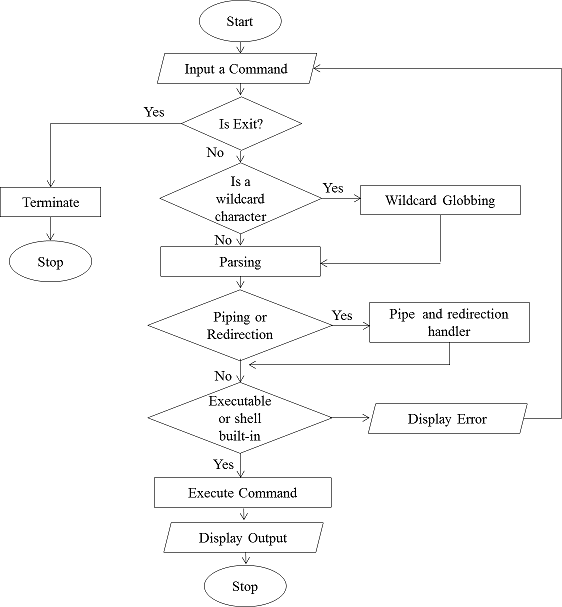
Examples for Variables, Control Structures, and Loops:
Variables:
    #!/bin/bash
    name="priyadarshi"
    echo "Hello, $name"
Control Structures:
#!/bin/bash if [ -f "/etc/passwd" ]; then echo "File exists." else echo "File does not exist." fiLoops:
    #!/bin/bash
    for i in {1..5}; do
        echo "Welcome $i times"
    done
Error Handling Example:
   #!/bin/bash
   if ! mkdir /tmp/mydir; then
       echo "Failed to create directory" >&2
       exit 1
   fi Shell Scripting
Best Practices
Comment Your Code: Make it easier to understand and maintain.
Use Meaningful Variable Names: Enhance readability.
Error Handling: Anticipate and handle errors gracefully.
Modularize Code: Break scripts into functions for reusability and clarity.
Conclusion
Mastering basic Linux shell scripting is a crucial step in the DevOps journey. It empowers you to automate tasks, manage systems efficiently, and integrate seamlessly with other tools. Practice writing scripts, experiment with different commands, and you'll soon unlock the full potential of Linux shell scripting.
Stay tuned for more updates as I continue my DevOps learning challenge. Happy scripting!
Feel free to connect with me on LinkedIn and share your experiences or ask questions. Let's learn and grow together in this exciting field of DevOps!