AWS Security Group

Greetings! 👋 I'm Priyadarshi Ranjan, a dedicated DevOps Engineer embarking on an enriching journey. Join me as I delve into the dynamic realms of cloud computing and DevOps through insightful blogs and updates. 🛠️ My focus? Harnessing AWS services, optimizing CI/CD pipelines, and mastering infrastructure as code. Whether you're peers, interns, or curious learners, let's thrive together in the vibrant DevOps ecosystem. 🌐 Connect with me for engaging discussions, shared insights, and mutual growth opportunities. Let's embrace the learning curve and excel in the dynamic realm of AWS and DevOps technology!
When managing resources in the cloud, security is one of the most crucial aspects. In AWS, a Security Group (SG) acts as a virtual firewall that controls the traffic to your EC2 instances and other resources. This blog will dive into
What is an AWS Security Group?
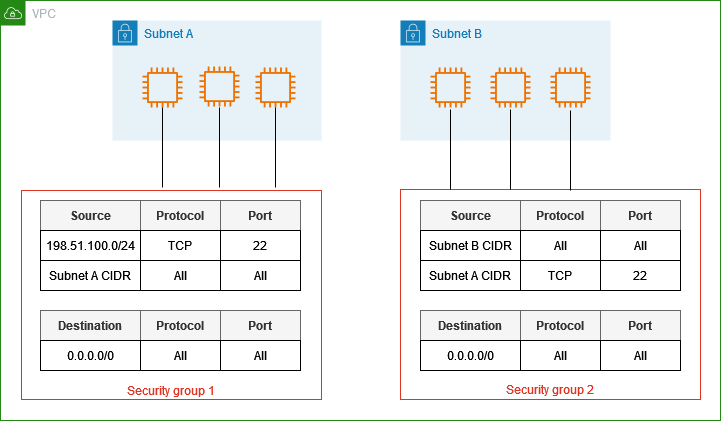
A Security Group (SG) in AWS is a virtual firewall that controls the inbound and outbound traffic to AWS resources, mainly EC2 instances. It's essentially a set of rules that determine which types of traffic are allowed to or from your instance. Security Groups provide security at the instance level by defining rules based on IP protocols, ports, and source IP addresses.
In simpler terms, a Security Group acts as a gatekeeper to your AWS resources, deciding which traffic can enter or leave based on the rules you set.
Types of Security Groups
Security Groups in AWS come with two types of rules:
Inbound Rules
Outbound Rules
1. Inbound Rules
Inbound rules control the incoming traffic to your resource. For example, if you have a web server hosted on an EC2 instance, you might want to allow HTTP traffic (port 80) so users can access your website.
- Example: Allow incoming traffic from all IPs to port 80 (HTTP) so that anyone can access the website.
codeType: HTTP
Protocol: TCP
Port: 80
Source: 0.0.0.0/0 (Anywhere)
In this case, the inbound rule allows anyone on the internet to access your web server via HTTP.
2. Outbound Rules
Outbound rules control the outgoing traffic from your resource. For example, if your EC2 instance needs to communicate with a database or external service, you can set outbound rules to control that traffic.
- Example: Allow outgoing traffic to a database running on port 3306 (MySQL).
 codeType: MySQL/Aurora
Protocol: TCP
Port: 3306
Destination: 192.168.1.1 (Database Server IP)
In this case, the EC2 instance can only connect to the MySQL database server.
How AWS Security Groups Work
Security Groups work by evaluating rules you configure and applying them to the instances attached to the Security Group. Unlike traditional firewalls, Security Groups are stateful, meaning they automatically allow responses to inbound traffic without needing explicit outbound rules.
- Example: If you allow inbound traffic to port 80 (HTTP), AWS will automatically allow the outbound response to that traffic.
You can attach multiple Security Groups to a single resource, allowing flexibility and fine-grained control over your network security.
Key Features:
Stateless vs Stateful: Security Groups are stateful. If you allow traffic in, the response is automatically allowed back out without explicitly configuring outbound rules.
VPC-Level Security: Security Groups operate at the Virtual Private Cloud (VPC) level. All instances within a VPC can share the same Security Group.
Default Deny: By default, all traffic is denied. You must explicitly allow the traffic you want to accept.
Why Use AWS Security Groups?
1. Enhanced Security: Security Groups ensure that only the specified traffic can enter or leave your EC2 instances. They act as the first line of defense for your application, blocking malicious traffic.
2. Fine-Grained Control: You can define precise traffic rules, such as only allowing a specific IP range to access your server or restricting access to certain ports.
3. Easy Management: Security Groups are easy to configure and modify. You can add or remove rules at any time, and the changes are applied immediately.
4. Centralized Control: You can attach the same Security Group to multiple instances, making it easy to apply consistent security settings across your resources.
Real-life Example: Suppose you have a web application hosted on AWS and need to:
Allow incoming HTTP/HTTPS traffic (ports 80/443) from anywhere so that users can access your site.
Allow SSH access (port 22) but only from your office's IP address to secure the server from unauthorized logins.
In this case, your Security Group might look like this:
Inbound Rules:
| Type | Protocol | Port Range | Source |
| HTTP | TCP | 80 | 0.0.0.0/0 |
| HTTPS | TCP | 443 | 0.0.0.0/0 |
| SSH | TCP | 22 | 203.0.113.1 (Your office IP) |
Outbound Rules: (Allowing all outgoing traffic)
| Type | Protocol | Port Range | Destination |
| All | All | All | 0.0.0.0/0 |
In this case, anyone can access your website via HTTP or HTTPS, but only users from your office can access the server via SSH.
Conclusion
AWS Security Groups are a crucial part of any cloud infrastructure, providing essential control over the traffic that flows in and out of your resources. With the flexibility of inbound and outbound rules, combined with their stateful nature, Security Groups offer a powerful way to secure your applications in AWS.
By understanding and utilizing Security Groups effectively, you can ensure that your cloud infrastructure is both highly secure and easily manageable. Whether you're running a small website or a large-scale application, properly configuring Security Groups will help keep your environment safe from unauthorized access while maintaining the performance and availability of your services.
Connect and Follow Me on Socials Network


